Inside Dora: How we built an AI harness to help advisors think and act

How Dora connects client information, AI models, financial calculators, and advisor approvals to help financial advisors think through plans and carry out decisions.
You’re reviewing statements, checking notes, and piecing together a client’s financial life. As ideas start to form, you’re also keeping a running list of records to update, questions to revisit, and changes to make. By the time you’ve caught everything up, you have to remind yourself where you were headed.
We built Dora to help you think things through, then take work off your plate once you’ve decided what to do.
“I wanted another advisor to bounce ideas off of and a paraplanner who actually gets the work done. Someone to help me think through a client’s situation, then take care of the work once I’ve decided what needs to happen.”
Taylor Stewart, Founder of Kerdora
Inside Kerdora, advisors can tell Dora what they want to accomplish in plain language. Dora can examine client information, extract data from documents, run tax and retirement scenarios, help develop a financial plan, and prepare updates for review.
Making that possible requires a shared planning data model, capable AI models, deterministic financial calculators, and a custom-built agent harness that connects reasoning to action.
A shared view of the client’s financial life
An account balance becomes useful planning information when you know who owns it, how it is taxed, what the client contributes, which goals it supports, and when they expect to use the money.
Kerdora’s planning areas share a common client data model. Accounts, ownership, goals, income, spending transactions, and other planning information are connected within Kerdora. Dora can examine actual transaction history alongside savings targets, notes, connected account data, and uploaded documents.
That structure allows Dora to work across planning areas. It also connects data maintenance to analysis: once an advisor approves an account update, the information becomes available to subsequent calculations and Dora’s planning work. The advisor can continue from the updated record without re-entering it elsewhere in Kerdora.
The harness that turns reasoning into work
Dora runs inside a custom-built agent harness: the system that connects AI models to Kerdora’s data, tools, and workflows. It provides instructions for working with each planning domain and tools for reading documents, running calculations, and preparing changes.

Dora’s harness connects client context, AI models, and planning tools. Record changes are presented for advisor approval.
An advisor doesn’t need to arrive with a decision already made:
“Review Bob and Sally’s spending transactions against their goals. What could they change, and where would freed-up cash make the biggest difference?”
Dora can connect transaction patterns to savings targets, debt, and retirement needs. It can flag costs that may fall as children get older, ask whether home repairs overlap with a separate reserve target, and help an advisor weigh where extra savings could go. Those connections give an advisor specific tradeoffs to work through with a client.

In this sample-household example, Dora connects transaction history to savings goals and flags spending assumptions for advisor review.
An advisor can also ask Dora to prepare specific updates for review:
“Review the attached screenshot of this account’s holdings and update it to match. Bob and Sally have also increased their spending by 10%, and Sally now wants to retire 2 years later. Once I approve those changes, show me a before-and-after comparison of their retirement outlook.”
Dora can work through that request in stages:
Read the screenshot, identify the holdings, and match them to Bob and Sally’s account.
Compare those holdings with existing records and flag any discrepancies or unclear matches.
Prepare the account updates, 10% spending increase, and Sally’s revised retirement age for approval.
After approval, compare Bob and Sally’s automatically updated retirement results with their prior plan.
Explain how their updated holdings, higher spending, and Sally’s later retirement affect their results, including assumptions used in both calculations.
The advisor describes the outcome. Dora works through the steps, pausing when it needs advisor input or approval.
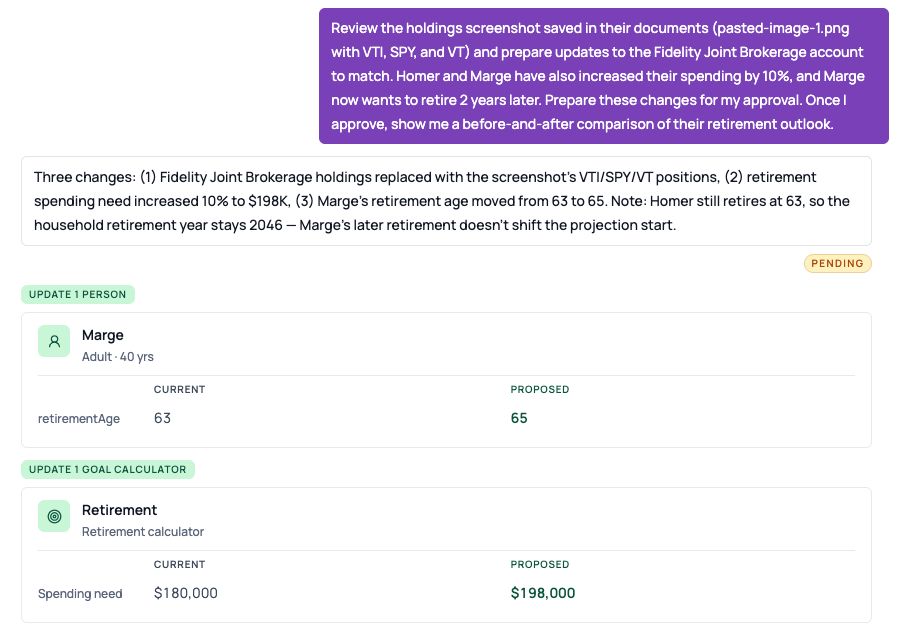
Dora prepares holdings, spending, and retirement updates for a sample household. Proposed changes remain pending advisor approval.
Financial math grounded in the planning engine
Dora has access to the same underlying planning logic used by Kerdora.
For tax and retirement scenarios, the AI helps interpret the request, identify inputs, and explain results. Kerdora’s deterministic calculation engines perform the financial computations using defined inputs and assumptions.
For what-if analysis, Dora can work on a separate copy of the client’s plan. It can explore changes and inspect their effects without altering the original record.
This connects conversational analysis to the actual planning engine. An advisor can ask about changing a retirement date or comparing tax scenarios, and Dora can use calculated results to inform its answer. The advisor reviews whether the assumptions and conclusions fit the client’s circumstances.
From documents to usable planning information
Document extraction is one of the clearest opportunities to reduce manual work. Dora can read supported statements, tax returns, and spreadsheets, compare their contents with existing records, and help bring the information into Kerdora. It is instructed to surface conflicting information, distinguish assumptions from recorded facts, and ask for clarification when needed. Once updates are approved, the advisor can continue into planning analysis or ask Dora to help prepare a client Guide explaining the next steps.
Models chosen for the task
Dora routes different types of work to different models and providers, selected through our own testing and evaluation of accuracy. Document extraction and multi-step planning analysis place different demands on a model. This approach lets us choose models suited to each task and evaluate replacements as capabilities improve.
The advisor describes the work; Dora’s underlying system handles model selection and access to the tools.
Protecting client information
Dora’s model requests use only zero-data-retention provider endpoints. Kerdora has also completed a SOC 2 Type 2 examination covering its security controls.
From a decision to work done
An advisor can explore a question with Dora, compare the options, and decide how to proceed. Then that same conversation can move into preparing updates, documenting the decision, and creating a client deliverable—with changes to the planning record presented for approval.
That is the experience we’re building toward: an advisor can say, “Here’s what I’m thinking,” work through it with Dora, and then say, “Let’s do it.”