Spending Tracking, Built Into the Plan
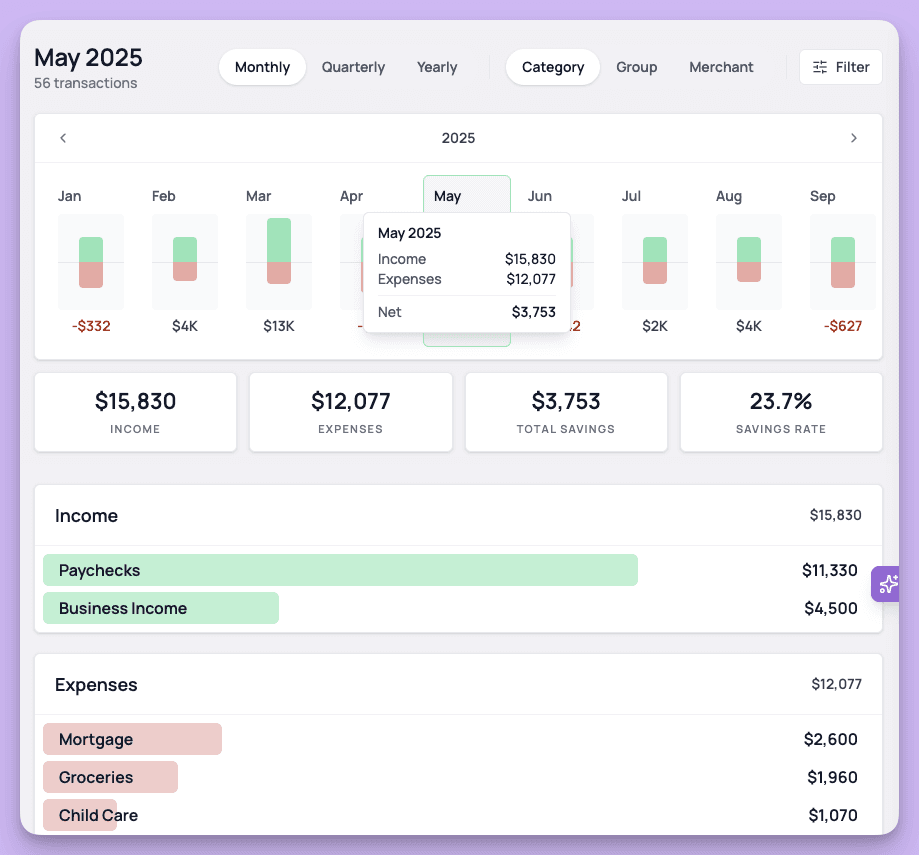
Spending tracking is live in Kerdora, with linked accounts, transaction imports, custom categories, rules, document extraction, and Dora-powered planning insights.
Spending is where the plan meets reality.
You can build a beautiful retirement analysis. You can model a home purchase, college funding, Roth conversions, debt payoff, emergency reserves, and every other planning decision that matters.
But if you do not have a clear picture of where money is actually going, the plan is always missing something.
That is why we built spending tracking directly into Kerdora.
Clients can now track spending, link accounts, import transaction history, organize categories, create rules, and turn cash flow into planning context.
And because Dora can work with the transaction data inside the plan, you can ask better questions than "where did the money go?"
You can ask what it means.
A Real Spending Tracker
This is a full spending tracker, not a tiny cash flow widget attached to the side of the plan.
Clients can:
Create custom categories
Categorize transactions
Build rules for future transactions
Review spending by category
Track trends over time
Visualize where money is going
Clean up transactions as their life changes
The goal is simple: make spending data usable without turning it into a second job.
Because that is usually the problem.
Most clients already know tracking spending would be valuable. They just do not want to maintain a messy spreadsheet forever, and they do not want to spend Saturday morning cleaning up 147 Amazon transactions.
Fair.
Get Data Into Kerdora From Almost Anywhere
Clients can link accounts and pull transactions into Kerdora automatically.
But they do not have to start from scratch.
If they already use a budgeting app, spreadsheet, CSV export, or another tracking tool, you can import that history into Kerdora.
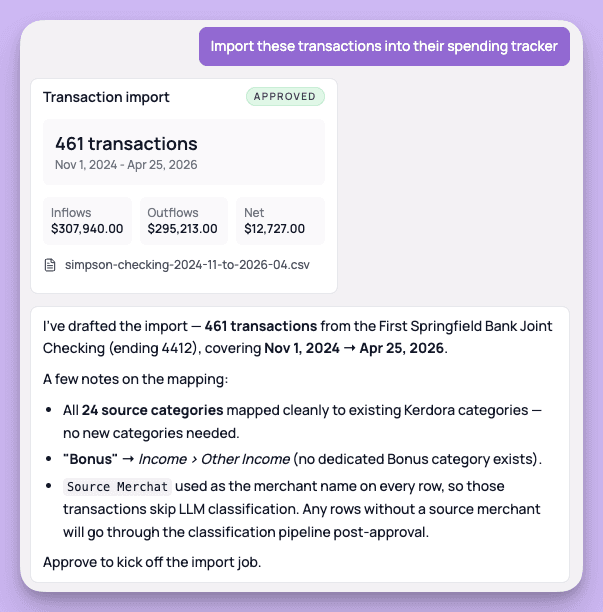
That matters because a lot of clients already have useful spending history somewhere else. We do not want that data trapped in another app. We want it connected to the plan.
You can also extract spending data from documents and statements, then use Dora to help organize it.
So the workflow can look a few different ways:
Link accounts and let transactions flow in
Import a CSV or spreadsheet
Bring over transaction history from an existing spending tool
Extract data from statements
Tell Dora what needs to change in plain English
The point is flexibility.
If the data exists, we want to help you use it.
Categories and Rules Without the Manual Grind
Spending tracking only works if the data stays organized.
That is where rules and categories matter.
You can build your own category structure, create rules for merchants, clean up past transactions, and keep future transactions organized automatically.
You can also ask Dora to help.
For example:
Add a category called Therapy and create a rule so transactions with Tiny Triumphs are categorized as Therapy.
Or:
Update all transactions over $25 at 7-Eleven to Gas and under $25 to Convenience Stores.
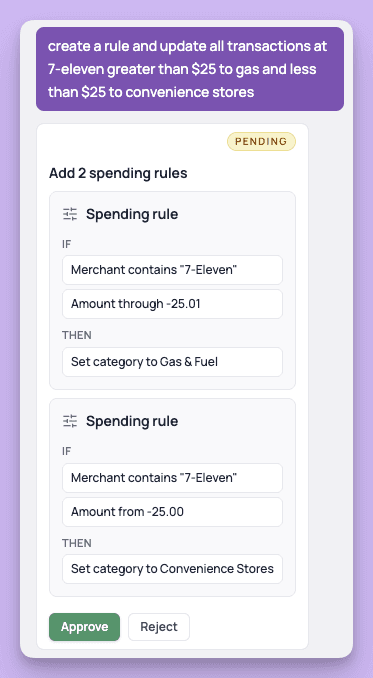
That is the kind of maintenance work that makes spending tracking annoying when you have to do it one transaction at a time.
Dora can help you clean it up faster.
Enriched Spending Data
Once transactions are categorized, Kerdora can do more than show a chart.
The categories become planning inputs.
That means spending can be connected to retirement, savings goals, debt payoff, home purchases, emergency reserves, insurance decisions, business planning, and all the other areas where cash flow matters.
Instead of looking at spending as a separate report, you can use it as context for better advice.
That is the bigger shift.
Dora Can Pull Planning Insights From the Spending Data
This is my favorite part.
Once spending data lives inside Kerdora, Dora can answer planning questions that would take a long time to work through manually.
Questions like:
How much will their spending change in retirement?
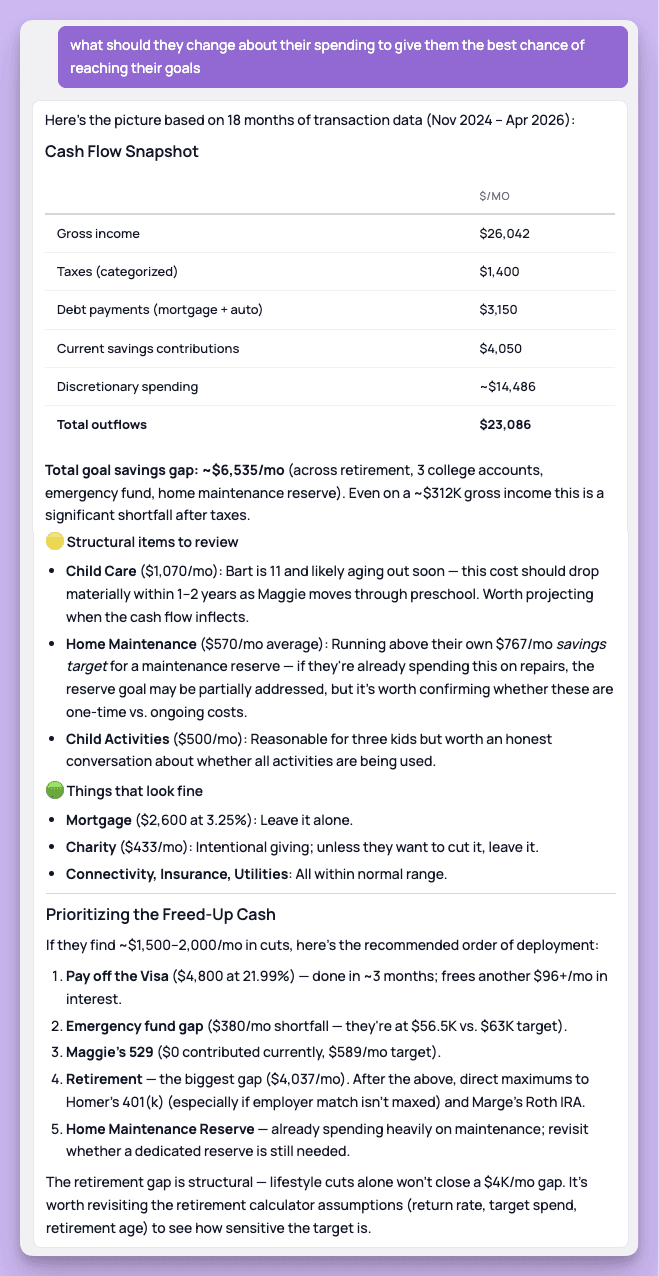
What could they change about their spending to meet their retirement savings goal?
If they buy a $600k house at a 6.5% interest rate, what areas could they cut to maintain their current savings rate?
Which categories have the most flexibility?
What changed in their spending over the last 90 days?
Which expenses are fixed, and which are actually adjustable?
What should we talk about in the next review meeting?
That is a different experience than handing a client a spending report.
Dora can look at the client's plan, their goals, their transactions, and the tradeoffs they are considering, then help you find the planning conversation inside the data.
A Simple Example
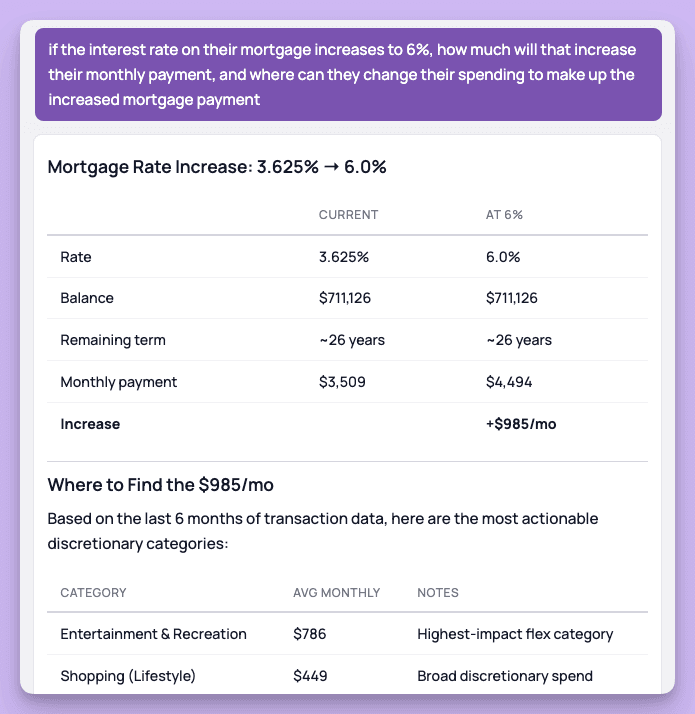
Let's say a client wants to understand what happens if their mortgage rate increases.
Dora can calculate the new payment, compare it to the current payment, and then look through recent spending to find where the difference could realistically come from.
Not theoretically.
Not from a generic budget template.
From their actual spending.
That means the conversation can move from:
Your payment may go up.
To:
Your payment would increase by about $985/month. Based on your last 6 months of spending, the most flexible categories are entertainment, shopping, restaurants, home maintenance, and streaming. Cutting entertainment, restaurants, and shopping by about 20% would cover the gap.
That is planning.
Why This Matters
Most clients do not need another disconnected budgeting app.
They need a clearer picture of their financial life.
They need to understand what is happening now, what could change, and what decisions actually move them closer to their goals.
Spending tracking helps with that.
Spending tracking inside the financial plan helps even more.
You get better data.
Clients get better clarity.
And the plan gets closer to what is actually happening month to month.
Spending tracking is live in Kerdora now.